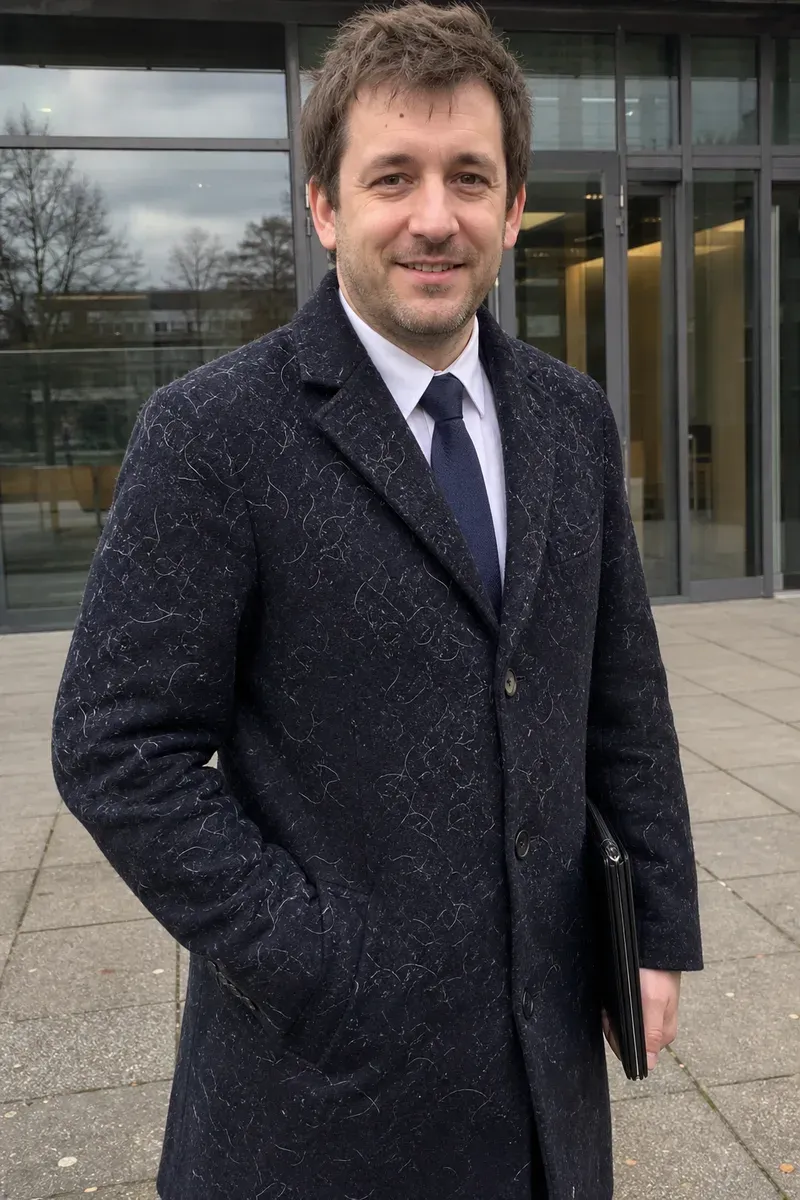

Removing lint from clothes in a photo means clearing the pet hair, fluff and dust that show up on dark fabric, so the outfit looks as clean as it did when you put it on. In this example, a man in a navy wool overcoat, white shirt and tie stands outside an office building on the day of a job interview. A friend took the photo so he could use it as his new professional headshot, but his dog's white hair is scattered all over the coat, and on dark wool it shows at any size.
What changed in this photo, and what stayed the same?
- Removed: the white hairs and lint across the coat's front, sleeves and lapels.
- Kept: his face and expression, the shirt and tie, the folder in his hand, the building's glass doors and the paving.
- Kept as well: the wool texture of the coat between the hairs; only the places where a hair lay are filled in.
Why is lint so visible on dark clothes in photos?
Light-colored hair and fibers reflect light, while navy, black and charcoal fabric absorbs it. Phone cameras also sharpen fine detail, which makes each hair stand out even more than it does in the mirror. A lint roller fixes it in person; once the photo is taken, the fix has to happen in editing.
How does an editor remove lint without flattening the fabric?
Each hair crosses the weave of the fabric. The editor replaces it with the fabric pattern that should be underneath, following the direction of the weave and the folds of the coat. Doing this hair by hair keeps the coat looking like wool rather than a smooth, painted surface. Seams, buttons and the shadows of folds stay where they are.
When is lint harder to remove?
- When the fabric has a strong pattern, such as tweed or herringbone, because the pattern has to line up across each repair.
- When the hair is thick enough to change the outline of the clothing.
- When the photo is small, since there is little fabric texture to work from.
For a wrinkled shirt in the same kind of photo, see remove wrinkles from clothes. To clean up a headshot further, see turn a selfie into a headshot. More under clothing photo editing.
Private: recreated on our own images, not customer photos
The before/after shown here is recreated on images created or licensed for this site — never a real customer's photo. Your upload is seen only by the editor working on it, and the edit comes with free revisions within 14 days of delivery if anything needs adjusting.