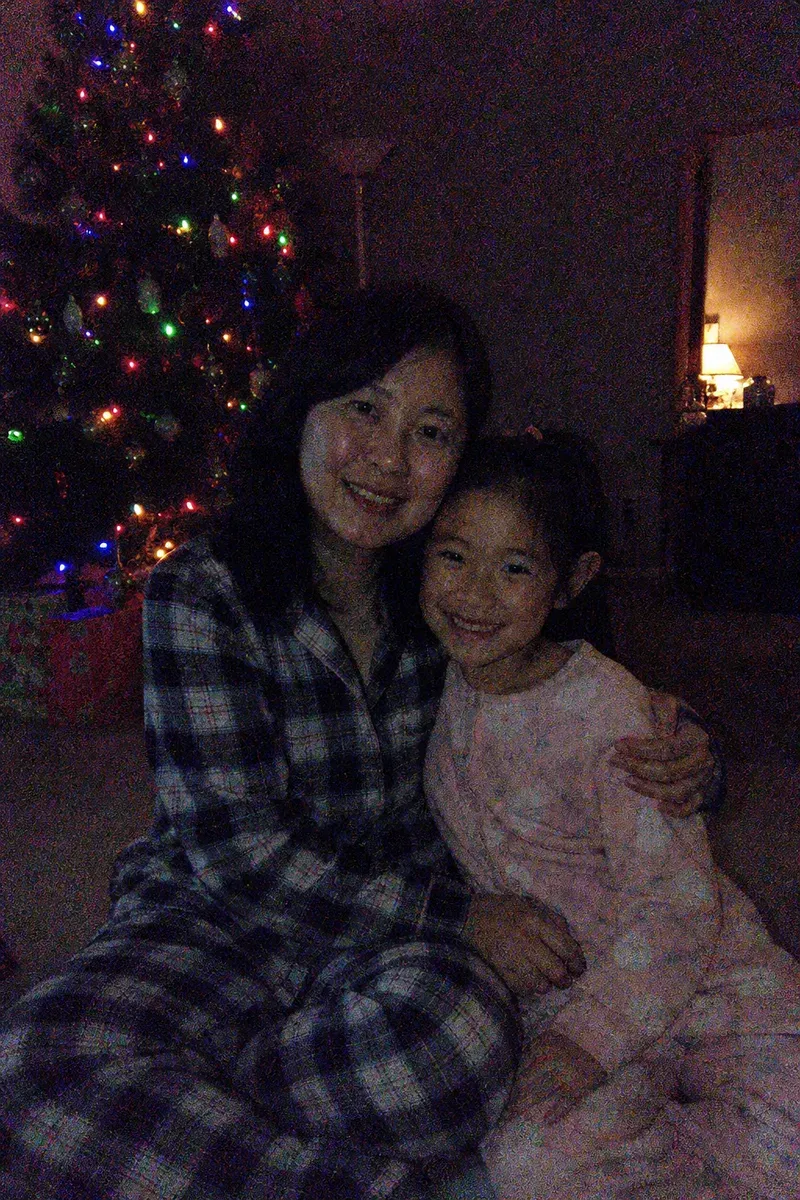

Removing grain from a photo means reducing the speckled, sandy noise that phones and cameras produce in low light, so faces and surfaces look clean again without turning them into plastic. In this example, a mother and her 8-year-old daughter, both in pajamas, sit close together on the living-room carpet on Christmas Eve. The only light comes from the tree lights and one small lamp, so the phone pushed its sensitivity up, and the photo came out covered in grain and colored speckle across the walls, pajamas and both faces.
What changed in this photo, and what stayed the same?
- Reduced: the grain and colored speckle on the walls, the pajamas, the carpet and the skin.
- Improved: the overall tone. The shadows are deep instead of gray, the warm glow of the tree lights is kept, and both faces are brighter, so they stand out from the dark room.
- Kept: the Christmas Eve mood. The room still looks like a night room, lit by the tree and the lamp; only the faces and the pajamas catch more of the light.
- Kept: both faces, their smiles and closeness, the tree, the presents and the lamp.
Why are dark photos so grainy?
In low light, a camera has very little light to work with, so it amplifies the signal it gets, and the random noise in the sensor is amplified with it. On a phone, that noise shows up as colored speckles and a gritty texture, worst in dark, flat areas like walls and shadows. Phone night modes reduce it but often smear faces in the process.
How does an editor reduce grain without making faces look waxy?
Flat areas such as walls, the ceiling and the background can be cleaned strongly, because they have no fine detail. Faces, hair and fabric are cleaned more gently, keeping edges such as eyelashes, hairlines and the weave of clothing. The result has a little softness in the darkest areas, which is better than the alternative: detail invented by sharpening, which looks fake at full size.
Why fix the tone as well as the grain?
Cleaning grain on its own often leaves a low-light photo looking flat: the speckle is gone, but the blacks turn gray and the colors go dull. So after the cleanup the editor does a light tone pass: sets a proper black point, keeps the color warm like the tree lights, and lifts the faces, without making the scene look as if the room lights were on.
What grain removal cannot do
- It cannot recover detail that the noise has already destroyed. Dark areas become smooth, not more detailed.
- It does not fix motion blur from a slow shutter; see fix blurry photos.
- Very small photos, or ones saved from messaging apps, have the noise compressed into blocks, which limits how clean they can get.
Send the original file from the phone. The editor usually corrects the tone along with the grain, as in this example. If you want the room to look much brighter, or prefer the original colors left exactly as they are, say so in the order notes. More under photo restoration.
Private: recreated on our own images, not customer photos
The before/after shown here is recreated on images created or licensed for this site — never a real customer's photo. Your upload is seen only by the editor working on it, and the edit comes with free revisions within 14 days of delivery if anything needs adjusting.